

A place for everyday supplies
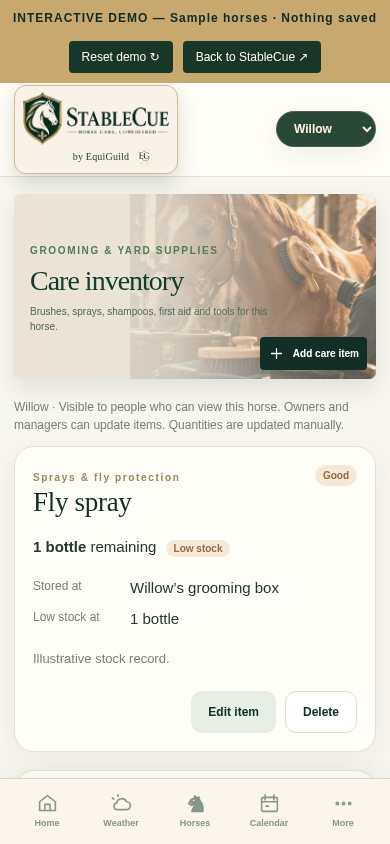
Keep grooming equipment, sprays, shampoo, first-aid supplies and tools with the right horse. Add brand, condition, storage location and notes.
Update quantities manually and choose a unit. Low-stock thresholds and expiry dates produce on-screen labels to help you review supplies; recording care does not automatically deduct stock.
Share the practical details
Care inventory follows the horse’s existing access permissions. Authorised carers can view supplies, and care editors can update them. Check products, expiry dates and instructions before use.
Review supplies in context
The inventory is a record of what you enter, not a live stock sensor or a purchasing service. Check the actual quantity, product label and condition before relying on a record. A low-stock label is a prompt to review your supplies, not an automatic order or notification to a supplier.
How to use it in StableCue
- Select the horse and open Care inventory.
- Add the product or tool and its quantity/unit.
- Set an optional low-stock threshold or expiry date.
- Save, then update quantities as supplies change.
Common questions
Is this included in my membership?
Yes. Monthly and annual membership include the same tools and unlimited horse profiles for one user.
Can I try it first?
Use the interactive demo with fictional horses. Demo changes last only for that session; no account is required.
Available in the iPhone and Android apps with membership. The public demo uses fictional records and sends no phone alerts. View membership and renewal information.
Which supplies are in the cupboard, and which are running low?
Grooming sprays, first-aid supplies and tools are easy to buy twice—or run out of unexpectedly. A simple inventory helps you review what you already have and what needs checking before a trip to the tack shop.
Putting it into practice
- 1Add an item with its description and quantity.
- 2Record low-stock thresholds or expiry details when useful.
- 3Check the list against the actual products before use.
Why this record can be useful
Always inspect labels, dates and product condition directly. The inventory records what you entered; it cannot verify suitability or safety.
Does StableCue order replacement supplies automatically?
No. The care inventory helps track products, quantities and optional low-stock thresholds; it is not an ordering system.