

Know what belongs with each horse
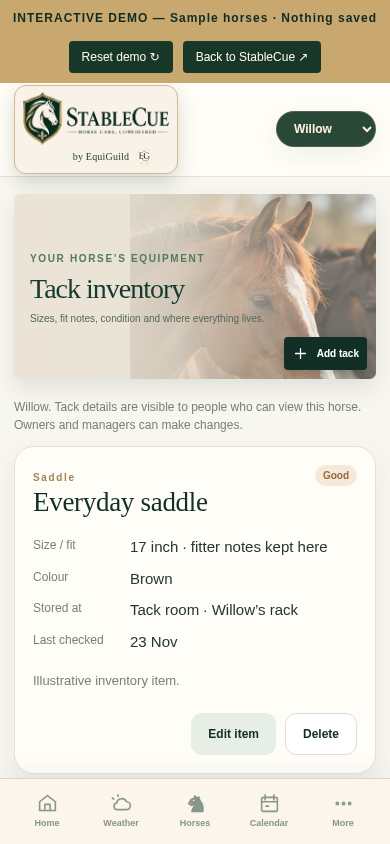
Record saddles, bridles, bits, girths, stirrups, saddle pads, headcollars, boots, rugs and other tack. Add the details that help you find and identify the right item.
Keep size or fit notes, condition, storage location and a checked date. These records do not replace professional fitting or safety checks.
Keep the inventory current
Edit or remove items when equipment changes. Tack records follow the horse’s existing sharing permissions; authorised viewers can read them and people with care-editing access can update them.
Practical notes at the yard
Keep useful descriptions with the equipment rather than relying on a message thread. When an item moves to another storage location or its condition changes, update that horse’s entry. Existing account-scoped offline saves queue supported changes and sync after reconnecting; review any reported sync conflict before continuing.
How to use it in StableCue
- Select the horse and open Tack inventory.
- Add the item, category and any identifying details.
- Record condition, storage and optional check date.
- Save and update the record when something changes.
Common questions
Is this included in my membership?
Yes. Monthly and annual membership include the same tools and unlimited horse profiles for one user.
Can I try it first?
Use the interactive demo with fictional horses. Demo changes last only for that session; no account is required.
Available in the iPhone and Android apps with membership. The public demo uses fictional records and sends no phone alerts. View membership and renewal information.
Which item belongs to which horse?
Two bridles may look similar but have different sizes, fittings or storage places. A per-horse inventory helps identify equipment and preserve notes about its condition or last check.
Putting it into practice
- 1Add tack under the correct horse.
- 2Record category, brand, size, fit and storage location.
- 3Update the condition and checked date when appropriate.
Why this record can be useful
This record does not replace inspecting equipment or using a qualified saddle fitter when required.
Can the inventory tell me whether a saddle fits safely?
No. It holds details you enter; professional fitting and physical checks remain important.